


You type a question into ChatGPT, Claude, or Gemini. The answer comes back flat, generic, and unhelpful.
A few minutes later, a colleague asks almost the exact same question and receives a sharp, practical, well-organized response.
What caused the difference?
It is rarely a secret AI trick. The difference comes down to instruction clarity. Modern AI models do not need complex code or hundred-word paragraphs to perform well. They simply need clear signals regarding your role, goal, context, audience, constraints, and preferred format.
Adding specific prompt keywords removes ambiguity and directs the model to the exact outcome you want.
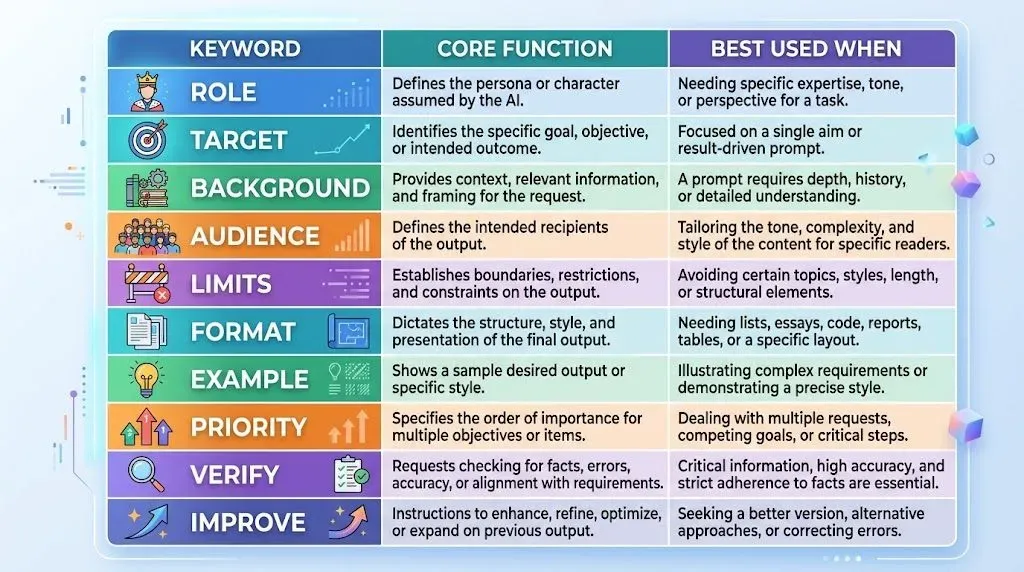
Quick Reference: 10 Essential Prompt Keywords
| Keyword | Core Function | Best Used When |
|---|---|---|
| Act as… | Sets role and perspective | You need specialized, expert advice |
| Goal: | Defines the main objective | You want results tied to a specific outcome |
| Context: | Provides essential background | Your request depends on past details or skill levels |
| Audience: | Adjusts tone and depth | Writing for a specific reader group |
| Constraints: | Sets boundaries and rules | You need to restrict length, tools, or style |
| Format: | Dictates output structure | You prefer tables, roadmaps, lists, or code |
| Example: | Provides a style reference | You want output matching a specific pattern |
| Prioritize: | Manages trade-offs | Multiple conflicting requirements exist |
| Verify: | Checks accuracy and assumptions | Fact-checking and reliable research matter |
| Improve: | Directs iterative editing | Refining a draft rather than starting over |
1. "Act as…" — Set the Expert Role
What It Does
The phrase "Act as" tells the AI model which knowledge base, tone, and perspective to adopt before it generates an answer. Without a role, the model defaults to a broad, generalized viewpoint that often feels shallow.
Weak Prompt:
Help me fix my resume.
Improved Prompt:
Act as an experienced tech recruiter. Review my resume for a junior Python developer position and highlight the top 5 areas where I can demonstrate stronger project impact.
Why It Works
Assigning a role changes how the model evaluates your input. A general assistant checks grammar, while a recruiter looks for measurable accomplishments, relevant technical skills, and hiring signals.
Useful Roles to Try:
- Technical: Senior Django Architect, SQL Performance Analyst, Linux System Administrator
- Business: SEO Content Strategist, Conversion Copywriter, Product Manager
- Educational: Patient Math Tutor, Academic Writing Advisor, Language Coach
Copy-Paste Formula:
Act as a [ROLE]. Help me [TASK] to achieve [TARGET OUTCOME].
2. "Goal:" — Define the Exact Outcome
What It Does
The "Goal:" keyword specifies what success looks like. AI models frequently produce answers that are factually accurate but practically useless because they do not understand the broader objective.
Weak Prompt:
Give me 5 article ideas about web development.
Improved Prompt:
Give me 5 article ideas about web development. Goal: Attract beginner programmers who want to build their first portfolio project this weekend.
Why It Works
Without a goal, the AI might suggest broad topics like "The History of JavaScript." Once you define the goal as helping beginners build a quick portfolio, the suggestions shift toward actionable, high-interest build tutorials.
Copy-Paste Formula:
[TASK]. Goal: [EXACT RESULT YOU WANT TO ACHIEVE]. Tailor all recommendations around this outcome.
3. "Context:" — Provide Missing Background Details
What It Does
The "Context:" keyword gives the AI the background information required to make informed recommendations. AI cannot guess your background knowledge, existing setup, or personal experience.
Weak Prompt:
What project should I build next?
Improved Prompt:
Context: I know basic Python syntax, functions, and list manipulation, but I have never worked with databases or web frameworks. Task: Suggest 3 intermediate practice projects that teach SQLite database connections step-by-step.
Why It Works
Adding background details stops the AI from recommending projects that are either too simple (like basic calculators) or overwhelmingly difficult (like distributed search engines).
Copy-Paste Formula:
Context: [CURRENT SITUATION, SKILL LEVEL, OR CONSTRAINTS]. Based on this background, [REQUEST].
4. "Audience:" — Adjust Tone, Vocabulary, and Depth
What It Does
The "Audience:" keyword dictates the reading level, technical depth, and tone of the explanation. A response written for an executive requires different language than one written for a middle school student.
Weak Prompt:
Explain how API caching works.
Improved Prompt:
Explain how API caching works. Audience: Junior web developers who understand HTTP requests but have never implemented Redis or cache headers.
Comparison Across Audiences:
- For Beginners: Focuses on real-world analogies, such as keeping frequently read books on your desk instead of walking to the library.
- For Engineers: Focuses on cache-control headers, TTL values, invalidation strategies, and latency reduction.
- For Business Leads: Focuses on server cost savings, faster page loads, and higher user retention.
Copy-Paste Formula:
Explain [TOPIC]. Audience: [TARGET READER PROFILE]. Adjust technical depth, examples, and vocabulary for this group.
5. "Constraints:" — Establish Strict Boundaries
What It Does
The "Constraints:" keyword prevents unwanted formats, excessive word counts, expensive suggestions, or irrelevant tools. Establishing clear boundaries improves prompt accuracy immediately.
Weak Prompt:
Write a weekly meal plan for me.
Improved Prompt:
Create a 5-day dinner meal plan. Constraints: Prep time under 25 minutes per meal. No specialized kitchen equipment (oven, stovetop, and blender only). High protein (at least 30 grams per serving). Keep ingredients accessible at standard grocery stores.
Common Constraint Categories:
- Length: Keep under 300 words, write exactly 3 bullet points.
- Tools: Pure vanilla JavaScript only, no third-party libraries.
- Tone: Direct and objective, avoid promotional fluff.
- Exclusions: Do not include paid plugins, avoid dairy ingredients.
Copy-Paste Formula:
[TASK]. Constraints: [LIMITATION 1], [LIMITATION 2], [RESTRICTION / WHAT TO AVOID]
6. "Format:" — Control the Structural Layout
What It Does
The "Format:" keyword specifies how the information should be visually organized on the page. AI defaults to long paragraphs of text unless told otherwise.
Weak Prompt:
Compare Python and PHP for web development.
Improved Prompt:
Compare Python (Django/FastAPI) and PHP (Laravel) for small business websites. Format: Create a Markdown table comparing Learning Curve, Hosting Options, Development Speed, and Maintenance Simplicity. Follow the table with a 3-sentence recommendation.
Useful Formats to Request:
- Structured Tables: For comparisons, schedules, and feature audits.
- Numbered Checklists: For standard operating procedures and step-by-step tutorials.
- Code Blocks: For clean, runnable scripts with inline comments.
- FAQ Blocks: For addressing specific objections or common setup questions.
Copy-Paste Formula:
[TASK]. Format: Present the response as [TABLE / STEP-BY-STEP CHECKLIST / BULLET LIST / CODE BLOCK] with [SPECIFIC COLUMNS OR SECTIONS].
7. "Example:" — Show the Exact Pattern You Want
What It Does
The "Example:" keyword uses few-shot prompting to guide the AI by demonstrating the exact structure, rhythm, and style you expect.
Weak Prompt:
Write 5 blog headlines about productivity.
Improved Prompt:
Write 5 blog post headlines about practical productivity for students. Example of desired style: "I Tested 5 Morning Habits for 30 Days: Here Is What Actually Worked". Constraints: Keep titles under 60 characters and avoid clickbait buzzwords.
Why It Works
Describing style abstractly (such as "make it punchy") leaves room for interpretation. Providing a concrete example anchors the model to a proven structure.
Copy-Paste Formula:
[TASK]. Example of the style and format I want: "[PASTE YOUR EXAMPLE HERE]". Generate [NUMBER] variations following this structure with original ideas.
8. "Prioritize:" — Guide Complex Decisions and Trade-offs
What It Does
When a request has multiple requirements, the "Prioritize:" keyword tells the AI which factors carry the most weight when trade-offs arise.
Weak Prompt:
Recommend a travel camera.
Improved Prompt:
Recommend 3 cameras for hiking and outdoor photography under $1,000. Prioritize: Weather sealing and durability, Compact weight, Low-light sensor performance. Note: Video capabilities are not important for this selection.
Why It Works
Every purchasing or design decision involves trade-offs. Stating your priorities explicitly prevents the AI from recommending options that compromise on your core requirements.
Copy-Paste Formula:
[TASK]. Prioritize [PRIMARY FACTOR] over [SECONDARY FACTOR]. Factor rankings: 1) [ITEM 1], 2) [ITEM 2], 3) [ITEM 3].
9. "Verify:" — Check Facts and Highlight Assumptions
What It Does
The "Verify:" keyword instructs the model to separate confirmed facts from assumptions, reducing errors on technical or research-heavy tasks.
Weak Prompt:
What changes were introduced in the latest release of Node.js?
Improved Prompt:
List the major changes introduced in Node.js 22 LTS. Verify: Clearly state verified core features versus experimental flags. If a detail depends on third-party package compatibility, explicitly flag that assumption.
Why It Works
While it does not eliminate the need for manual review, asking the model to verify its reasoning encourages cautious, transparent answers rather than unsupported claims.
Copy-Paste Formula:
[TASK]. Verify: Separate established facts from assumptions. Flag any areas that require checking against primary technical documentation.
10. "Improve:" — Direct Iterative Refinement
What It Does
The "Improve:" keyword allows you to refine existing output rather than rewriting an entire prompt from scratch.
Weak Follow-Up:
Make it better.
Improved Follow-Up:
Improve this draft. Make the tone more conversational, cut the total word count by 25%, and replace the abstract explanations in Section 2 with a concrete code snippet.
Practical Ways to Direct Improvements:
- Clarify: "Rewrite Section 3 so that a beginner can follow the steps without external tools."
- Shorten: "Condense this explanation into 3 direct bullet points."
- Tone Adjustment: "Remove corporate jargon and adjust to an instructional, friendly tone."
Copy-Paste Formula:
Improve the text above by: 1) [SPECIFIC FIX 1], 2) [SPECIFIC FIX 2], and 3) removing [UNWANTED ELEMENT].
The Master Prompt Framework
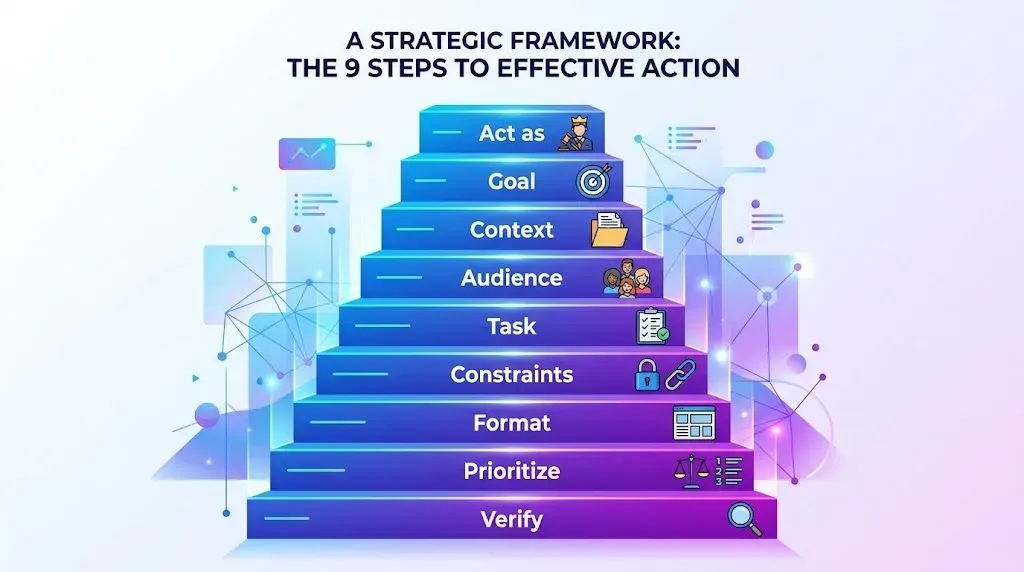
You do not need to use all 10 keywords in every prompt. For complex requests, however, combining 4 to 6 of these keywords creates a reliable, repeatable template:
Act as: [Specialized Role]
Goal: [Target Objective]
Context: [Relevant Background & Skill Level]
Audience: [Target Reader]
Task: [Clear Action Instruction]
Constraints: [Length, Tools, Style Rules]
Format: [Table, Steps, Code, Checklist]
Prioritize: [Key Trade-Offs]
Verify: [Flag Assumptions and Check Sources]
Master Prompt in Practice:
Here is how the framework looks when applied to a real content creation task:
Act as: Senior SEO Content Editor.
Goal: Create an outline for a tutorial that helps beginners publish their first web page.
Context: Our site focuses on practical web development guides without unnecessary theory.
Audience: Beginners who know basic HTML tags but have never used CSS or FTP.
Task: Provide a 5-step tutorial outline.
Constraints: Keep explanations under 100 words per step. Avoid paid software recommendations.
Format: Numbered list with a "Common Mistake to Avoid" callout for each step.
Prioritize: Practical execution speed and simple terminology.
Troubleshooting: Which Keyword Should You Use First?
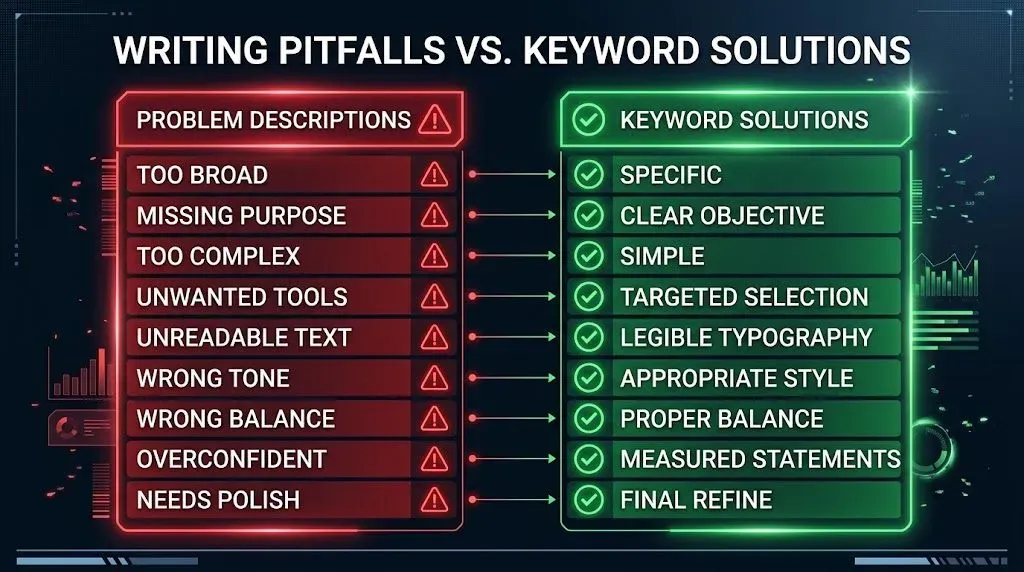
When an AI response misses the mark, use this quick diagnosis table:
| Problem | Keyword to Add |
|---|---|
| Answer feels too broad or vague? | Add Context: to provide clear background. |
| Answer misses your purpose? | Add Goal: to clarify the end result. |
| Answer is too complex or too basic? | Add Audience: to adjust the depth. |
| Answer includes unwanted tools or advice? | Add Constraints: to set limits. |
| Answer is an unreadable block of text? | Add Format: to request tables or lists. |
| Tone does not match your brand? | Add Example: to provide a style reference. |
| Model chose the wrong balance? | Add Prioritize: to guide the trade-offs. |
| Model sounds overly confident on uncertain facts? | Add Verify: to audit claims. |
| Answer is almost right, but needs polish? | Use Improve: to direct edits. |








Leave a Comment
Your comment is completely private and secure. We never publish comments publicly on our website. Your message will be sent directly to our team.