


If you have been building web apps with Lovable, you already know how powerful an AI-first workflow can be. But maybe you hit a wall with its pricing, its restrictive cloud environment, or its lack of deep backend control. Or maybe you are just curious about what else is out there in this rapidly evolving space.
The good news is, Lovable is not the only game in town. The 2026 AI web builder landscape offers a rich ecosystem of alternatives, each with a different take on what it means to build with AI. Some are serious contenders for full-stack production apps; others are specialized tools for pure frontend, visual prototyping, or completely local development.
To help you find the perfect fit, we have broken down the top 8 alternatives to Lovable in 2026, analyzing everything from architecture and pricing to real-world usability and deployment workflows.
Best Lovable Alternatives: At a Glance
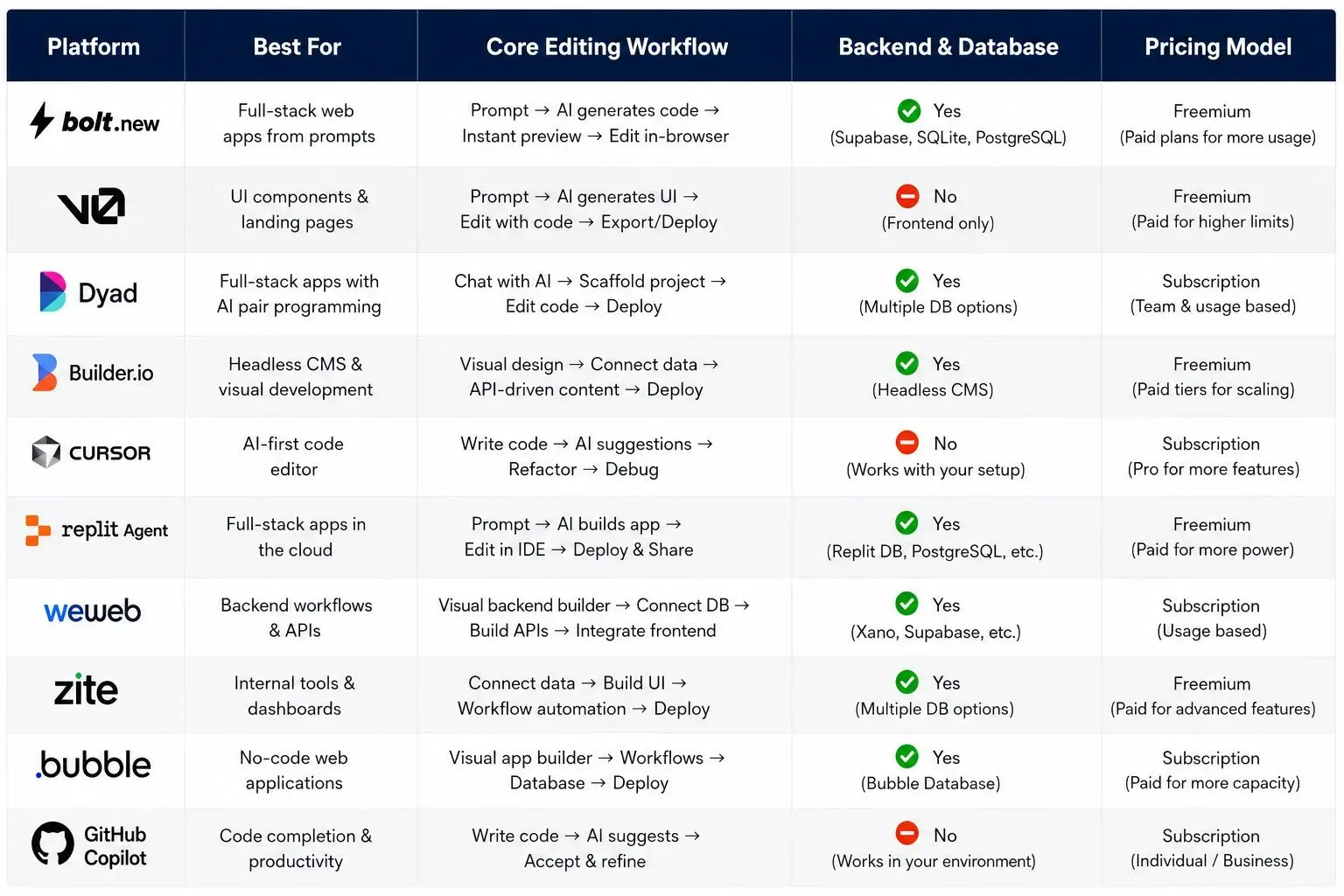
Detailed Breakdown: The Best Lovable Alternatives in 2026
1. Bolt.new: Best for In-Browser Full-Stack Development
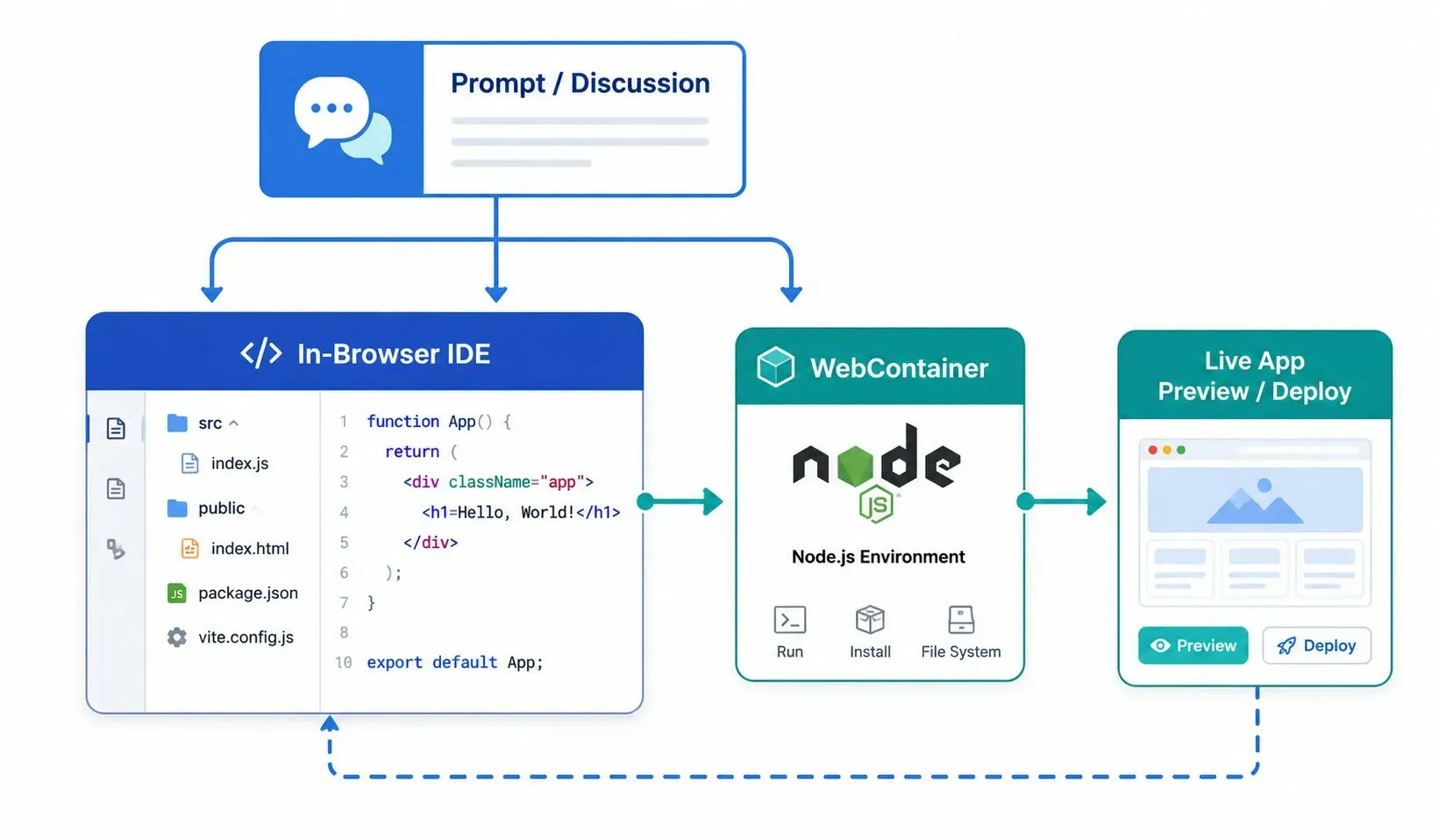
Bolt.new is the closest direct competitor to Lovable in terms of workflow. It offers an in-browser full-stack environment powered by WebContainers, which means the entire development environment runs inside your browser tab. You get real-time AI code generation, live previews, and seamless deployment to platforms like Netlify or Vercel.
Best For: Developers who want a browser-based, full-stack experience similar to Lovable.
Core Editing Workflow: You type or speak a prompt in a chat interface, and Bolt.new generates the app structure, writes the code, and runs it in a live preview window.
Backend & Database: You can integrate directly with Supabase for a full-stack PostgreSQL backend.
Pricing: It offers a free tier with a generous monthly usage limit; paid plans provide more compute, prompts, and team collaboration features.
2. v0 by Vercel: Best for Design-Forward React Frontends
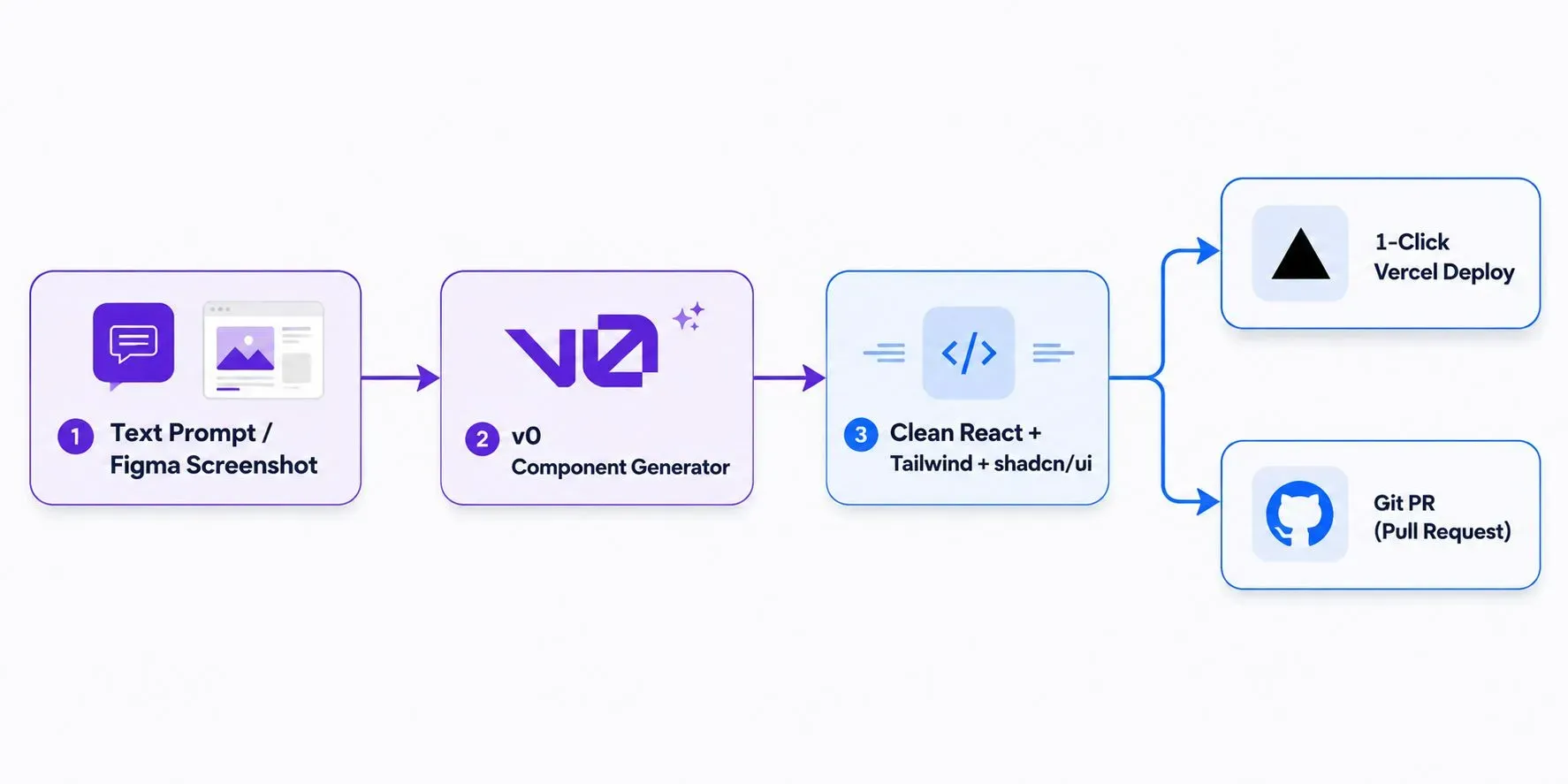
v0 by Vercel is not a full-stack solution like Bolt.new. It is a focused AI tool for generating high-quality React frontend components. You feed it a text description or a screenshot of a UI, and it spits out clean, ready-to-use React + Tailwind code (often with shadcn/ui). It is tailored for designers, frontend engineers, and anyone who wants to quickly prototype a beautiful user interface.
Best For: Frontend developers and designers who want instant React/Tailwind UI components.
Core Editing Workflow: You provide a natural language prompt or a Figma screenshot, and v0 generates high-quality, copy-paste-ready React components.
Backend & Database: It is frontend-only. You handle backend, database, and API integrations separately.
Pricing: It offers a free tier; paid plans unlock more advanced features, integrations, and larger generation limits.
3. Dyad: Best Free, Open-Source, and Local-First Alternative
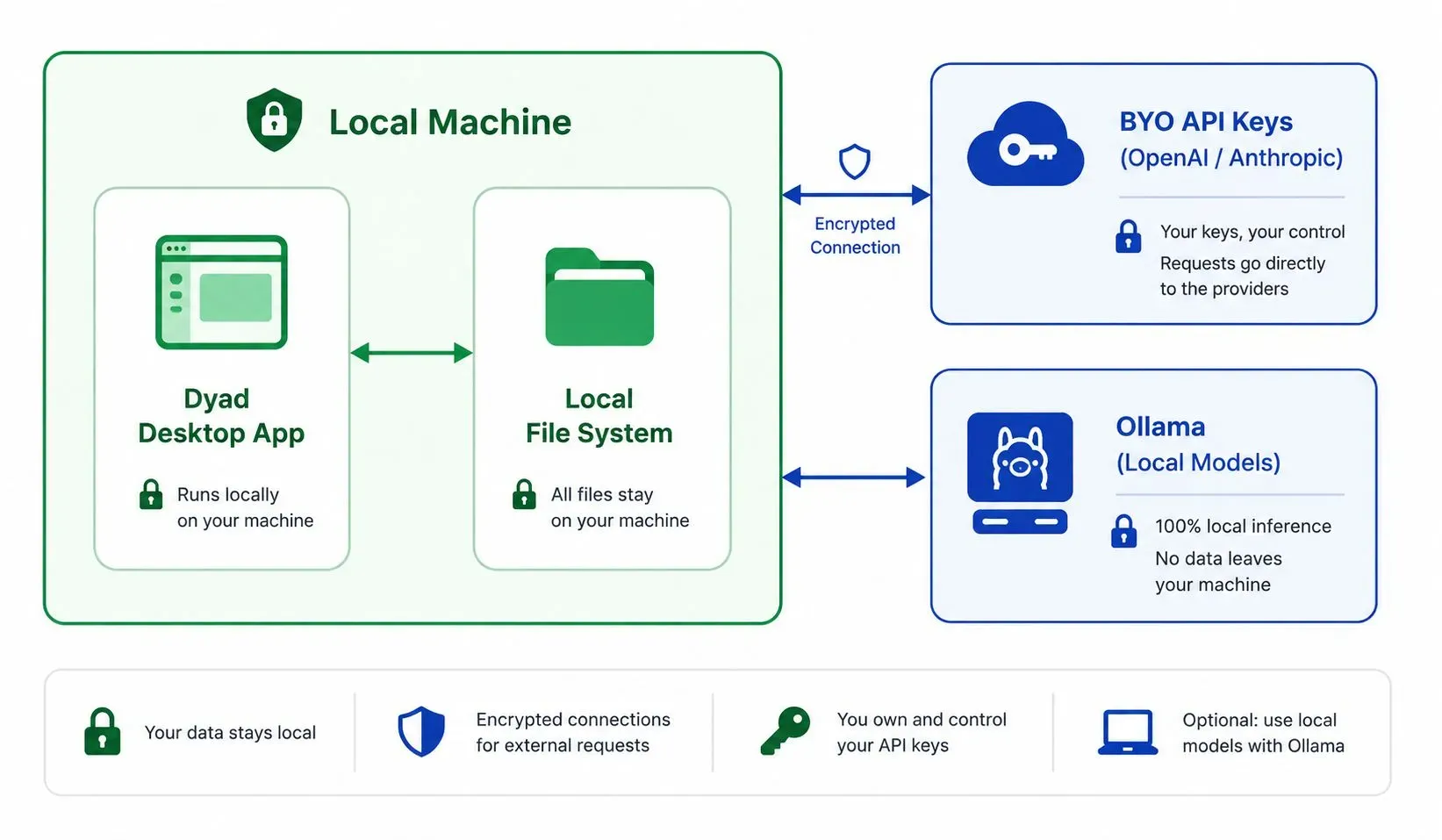
Dyad is a free, open-source desktop app that brings a Lovable-like experience to your local machine. You type prompts and generate web components directly in a desktop app that can run either on local LLMs via Ollama (ensuring 100% data privacy) or by leveraging your own API keys from OpenAI or Anthropic.
Best For: Privacy-obsessed developers who want full control over their code and data.
Core Editing Workflow: You type a prompt in Dyad's desktop interface, and it generates the code for you to save directly to your local file system.
Backend & Database: It is frontend-focused; you integrate the code into your own backend architecture.
Pricing: 100% Free and Open Source.
4. Builder.io: Best for Existing Repositories and PR Workflows
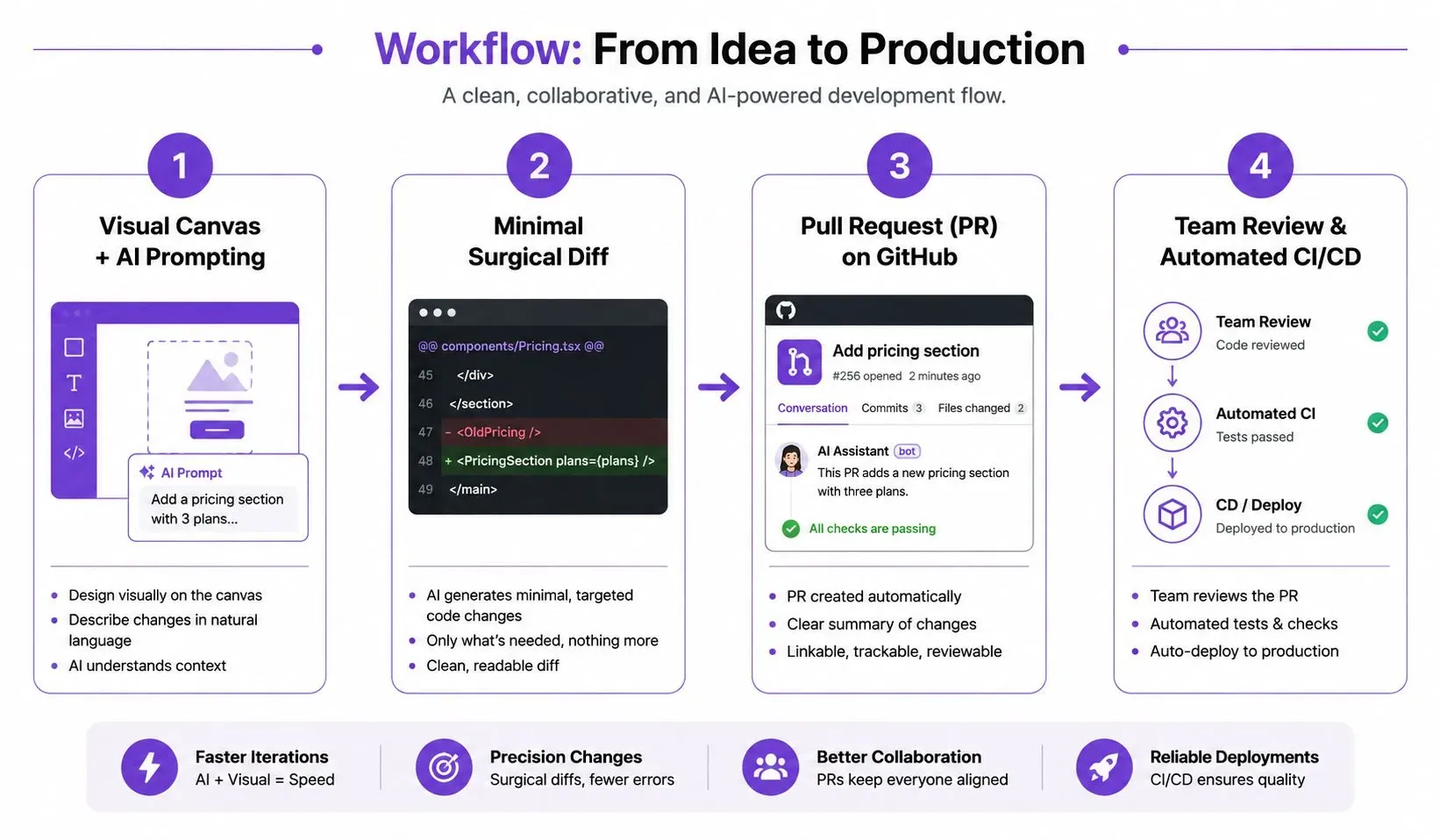
Builder.io is a powerful visual builder for existing codebases. Unlike the AI-first generation tools, it offers a visual canvas where you can drag, drop, and edit your existing React, Vue, or Angular components. Its AI helps you write prompts to generate new UI elements or modify existing ones, but it operates with a strict GitHub Pull Request workflow.
Best For: Teams with an existing codebase who want to use AI to visually build and propose UI changes.
Core Editing Workflow: You use a visual canvas to build a UI, and Builder.io generates a minimal "surgical diff" that is submitted as a GitHub Pull Request for team review.
Backend & Database: It integrates with your existing headless CMS, APIs, and databases.
Pricing: It offers a free tier; paid plans start at a reasonable monthly cost based on team size.
5. Cursor: Best for Developers Seeking Full Codebase Context
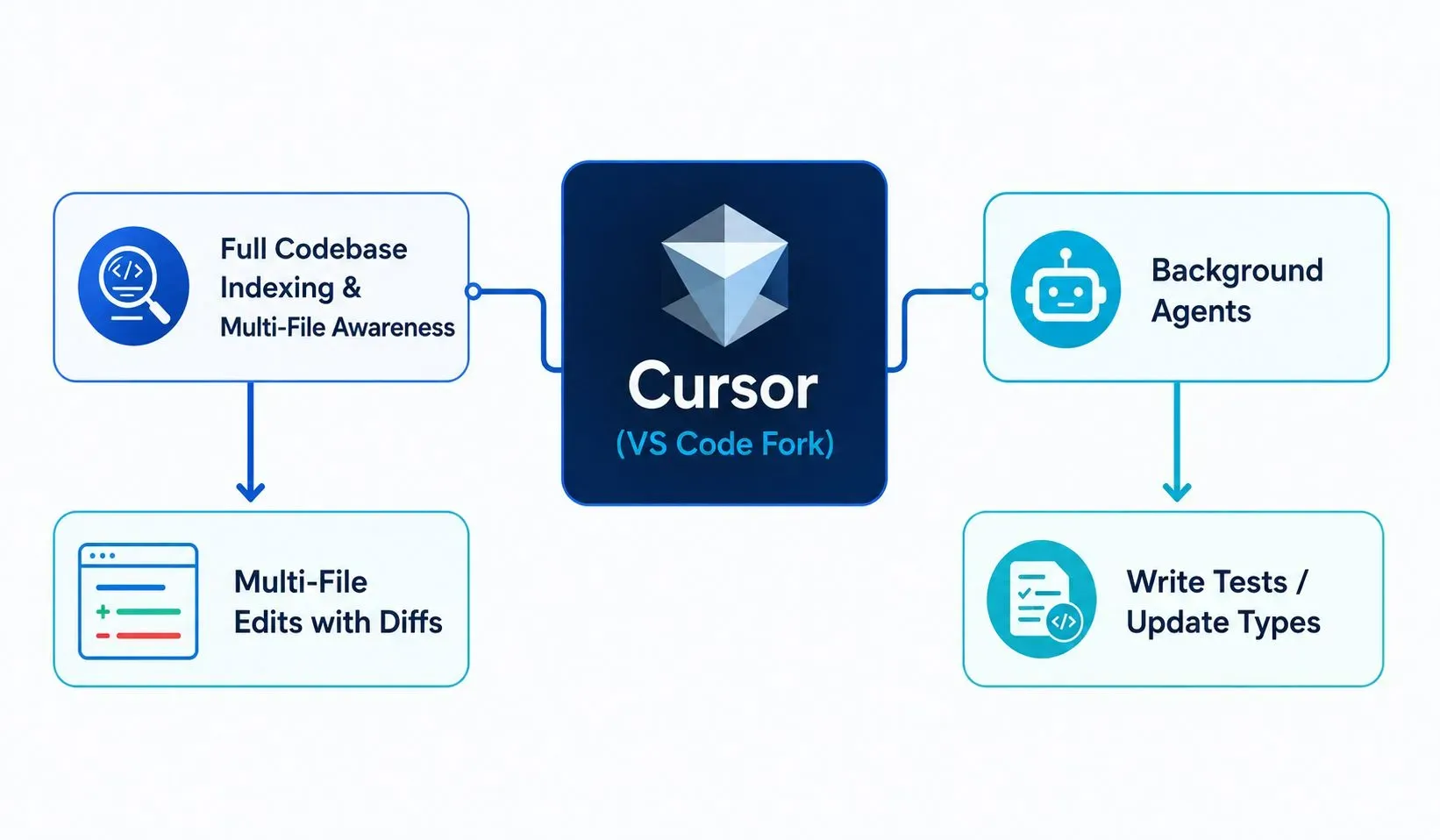
Cursor is a fork of VS Code that has been fundamentally rebuilt around AI. It is not a chat-based app builder like Lovable or Bolt.new. It is an AI-powered code editor. It does not generate an app from scratch; it works alongside you inside your existing codebase, reading your files, understanding your imports, and making highly relevant suggestions.
Best For: Professional developers who want an AI pair programmer deeply integrated into their editor.
Core Editing Workflow: You work in a familiar VS Code environment. Cursor indexes your codebase and provides multi-file edits, diff previews, and background agents (e.g., writing tests while you code).
Backend & Database: Not applicable; it is a code editor, not an app builder.
Pricing: Offers a free tier; Pro plans unlock unlimited advanced AI usage and features.
6. Replit Agent: Best for Collaborative Cloud Development
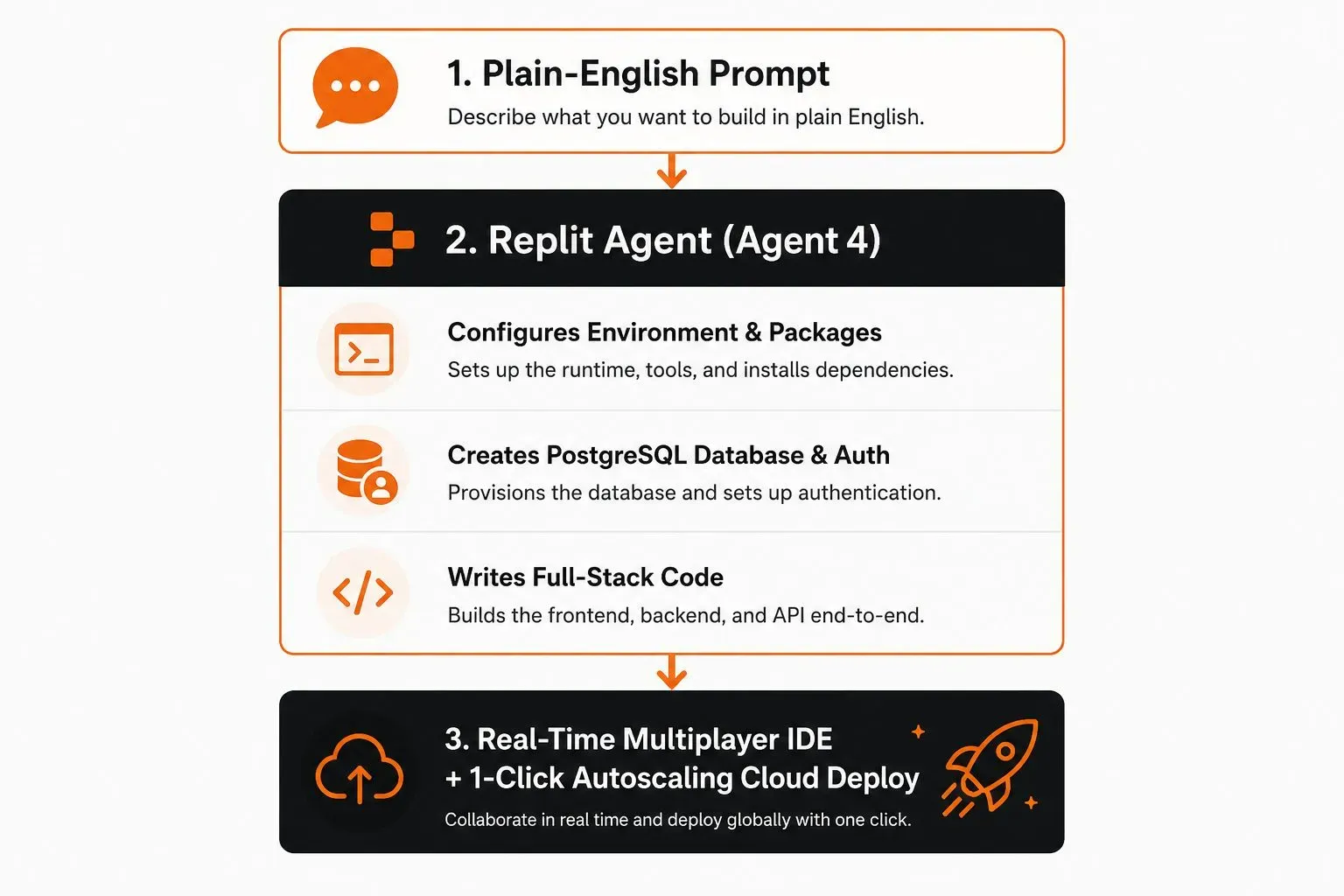
Replit Agent is an AI-powered development environment that goes beyond code generation. It acts as a full-stack development agent. You give it a plain-English prompt, and it configures your development environment, sets up a PostgreSQL database, and writes the entire full-stack codebase for you. It then deploys your app to a live URL.
Best For: Solo developers and teams who want an AI to handle the entire app lifecycle from idea to deploy.
Core Editing Workflow: You write a prompt, and the Agent sets up the environment, writes the code, and deploys the app—all within a real-time multiplayer IDE.
Backend & Database: The Agent can configure and set up a PostgreSQL database and auth infrastructure automatically.
Pricing: Offers a free tier with limitations; paid plans provide more resources and agentic capabilities.
7. WeWeb: Best for Visual Frontend Control with Any Backend
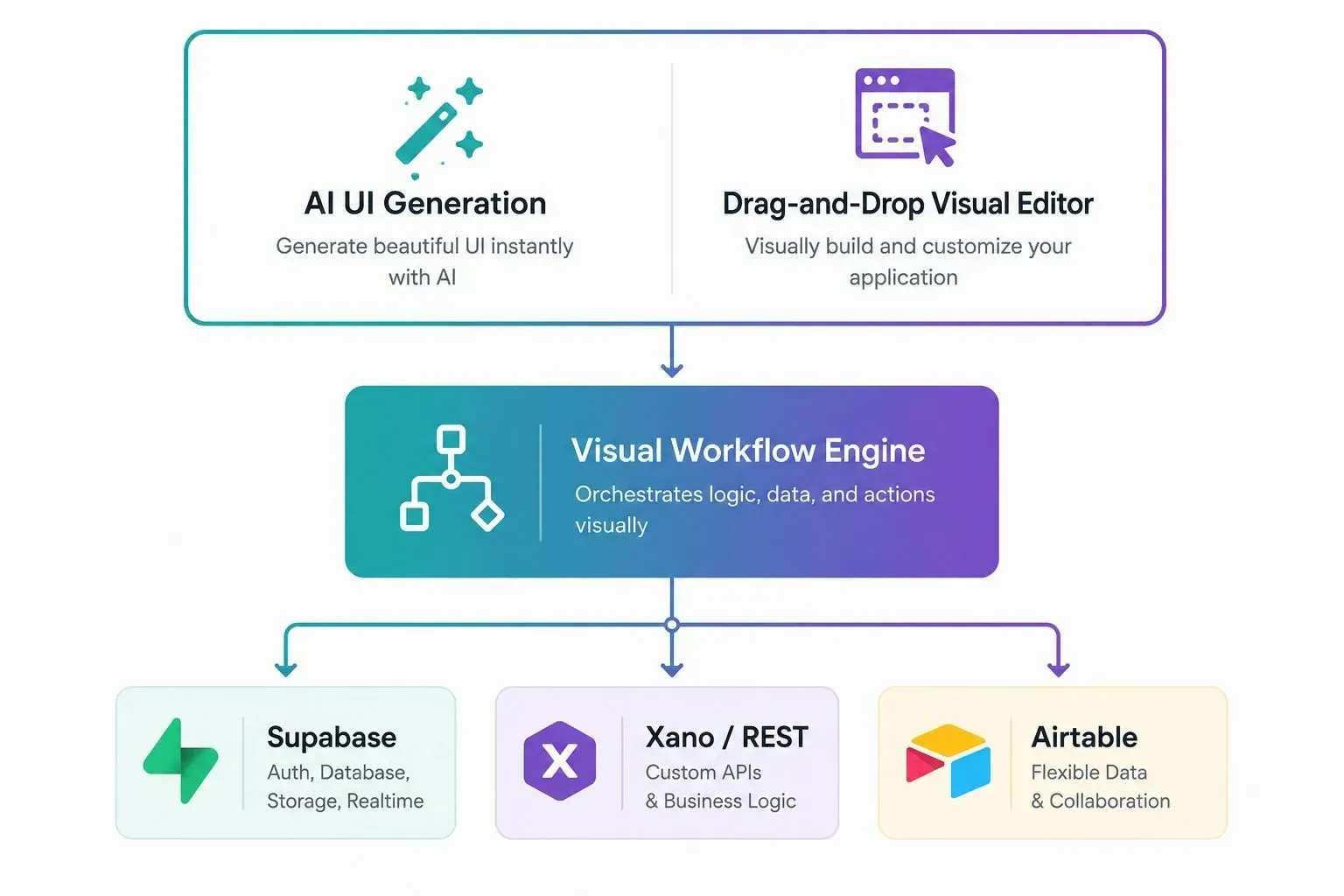
WeWeb is a visual frontend builder that bridges the gap between no-code and pro-code. It offers a powerful drag-and-drop interface for building UIs, combined with an AI assistant that can generate components from text prompts. It is built to integrate seamlessly with any backend—Supabase, Xano, REST, GraphQL, or Airtable.
Best For: Product teams who need a fast, visual UI builder that connects to any backend.
Core Editing Workflow: You visually drag and drop components, or use AI prompts to generate UI elements. A visual workflow engine connects your UI to your backend data sources.
Backend & Database: Natively connects to Supabase, Xano, REST APIs, and Airtable.
Pricing: It offers a free tier; paid plans provide more features, projects, and team seats.
8. Honorable Mentions: Zite, Bubble, and GitHub Copilot
Zite: An emerging AI-first platform focused on generating complete web apps from natural language, with a strong emphasis on frontend performance.
Bubble: The veteran no-code giant. Bubble is not AI-first, but it has integrated AI features that help you build UIs faster. It is the most mature platform for complex business logic without writing code.
GitHub Copilot: Copilot is not an app builder. It is an AI assistant for writing code in your existing IDE (VS Code, Neovim, JetBrains). It excels at autocompleting code, generating boilerplate, and suggesting fixes.
Final Verdict: Which Lovable Alternative Should You Choose?
Choosing the right alternative comes down to a single factor: how you work.
Choose Bolt.new if you want the most direct, in-browser full-stack experience, similar to Lovable, with a strong focus on speed and deployment.
Choose v0 if your primary goal is to build beautiful, production-ready React frontend components fast.
Choose Dyad if you value data privacy and want an open-source, local-first alternative.
Choose Builder.io if you are already working on an existing codebase and need a visual tool that fits into your team's Git workflow.
Choose Cursor if you are a professional developer looking for the most advanced AI-assisted code editor.
Choose Replit Agent if you want a true cloud-based agent that handles the entire app lifecycle from idea to live deploy.
Choose WeWeb if you want a visual drag-and-drop builder that works with your choice of backend.


Leave a Comment
Your comment is completely private and secure. We never publish comments publicly on our website. Your message will be sent directly to our team.