


Cursor’s official confirmation of its acquisition by SpaceX on August 14, 2026, sent shockwaves through the software engineering community. Almost immediately, developer forums, Discord servers, and team chat channels filled with heated debates: Should you stay on Cursor, or is it time to migrate to an alternative?
For many teams, the deal raises immediate questions around telemetry, enterprise code confidentiality, defense contract alignment, and future pricing structures. For others, Cursor’s multi-file editing and codebase indexing remain too effective to abandon overnight.
Below is an objective evaluation of whether you should leave Cursor, followed by a hands-on review of the 7 best Cursor alternatives evaluated across data privacy, pricing models, and coding capabilities.
Should You Stay or Should You Leave?
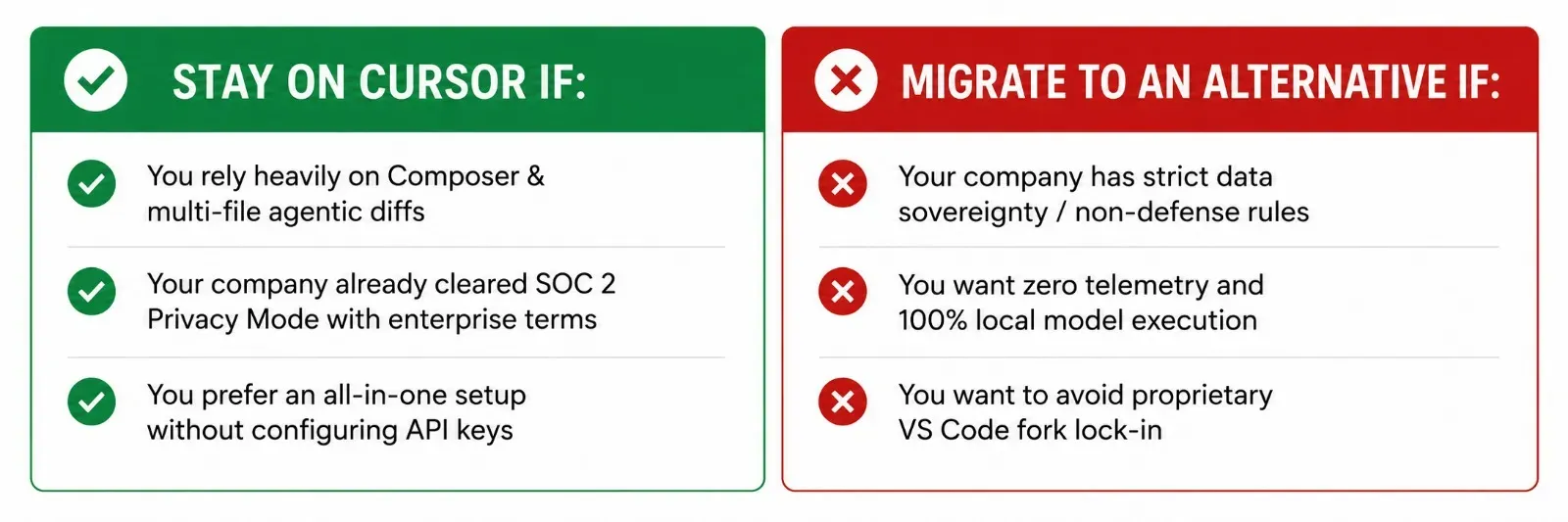
Why Developers Are Staying
- Maturity of Agent Workflows: Cursor’s multi-file refactoring, background indexing, and terminal error healing are mature and tested at scale.
- Familiarity: Because it is a direct fork of VS Code, extensions, keybindings, and themes carry over with zero friction.
- Privacy Mode Guarantees: Enterprise contracts still enforce zero-data-retention clauses with upstream model providers.
Why Developers Are Leaving
- Corporate Alignment & Geopolitics: Many international developers, open-source contributors, and enterprises have internal policies restricting tools owned by aerospace and defense contractors.
- The "Closed Fork" Risk: Cursor remains a closed-source fork of VS Code. Upstream security patches can lag, and users are locked into Cursor's proprietary infrastructure.
- Overage Costs: The $20/month Pro tier can quickly turn into $60 to $200 per month once heavy multi-file background agents burn through included usage caps.
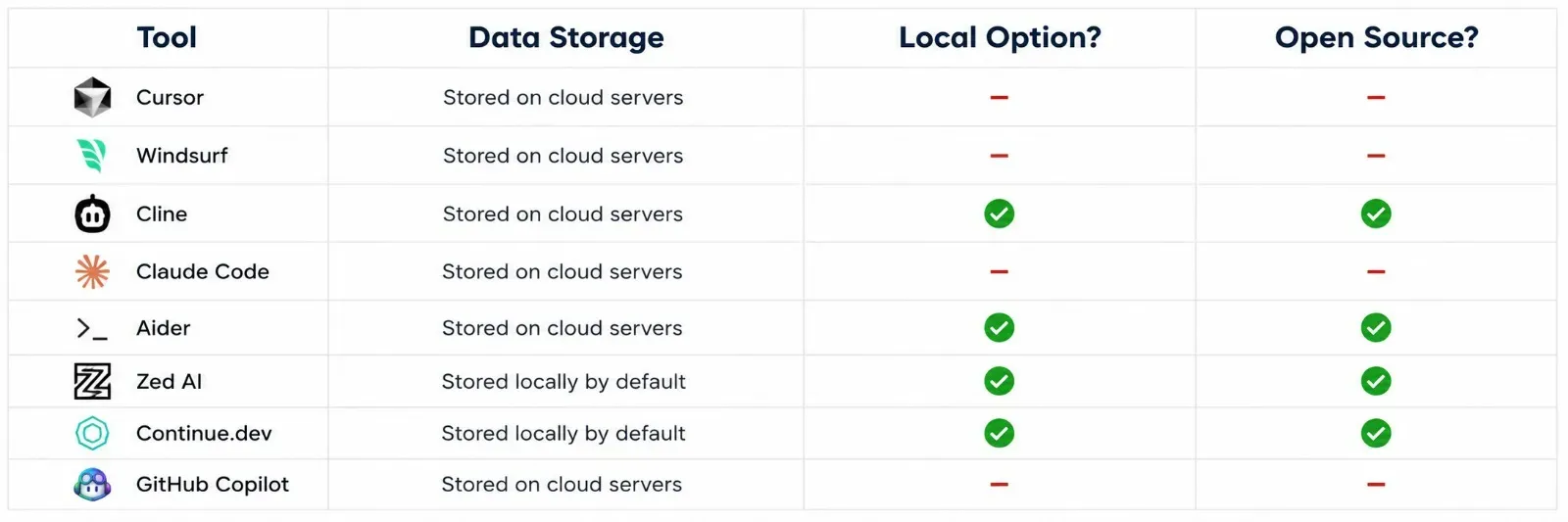
Top 7 Cursor Alternatives: At a Glance
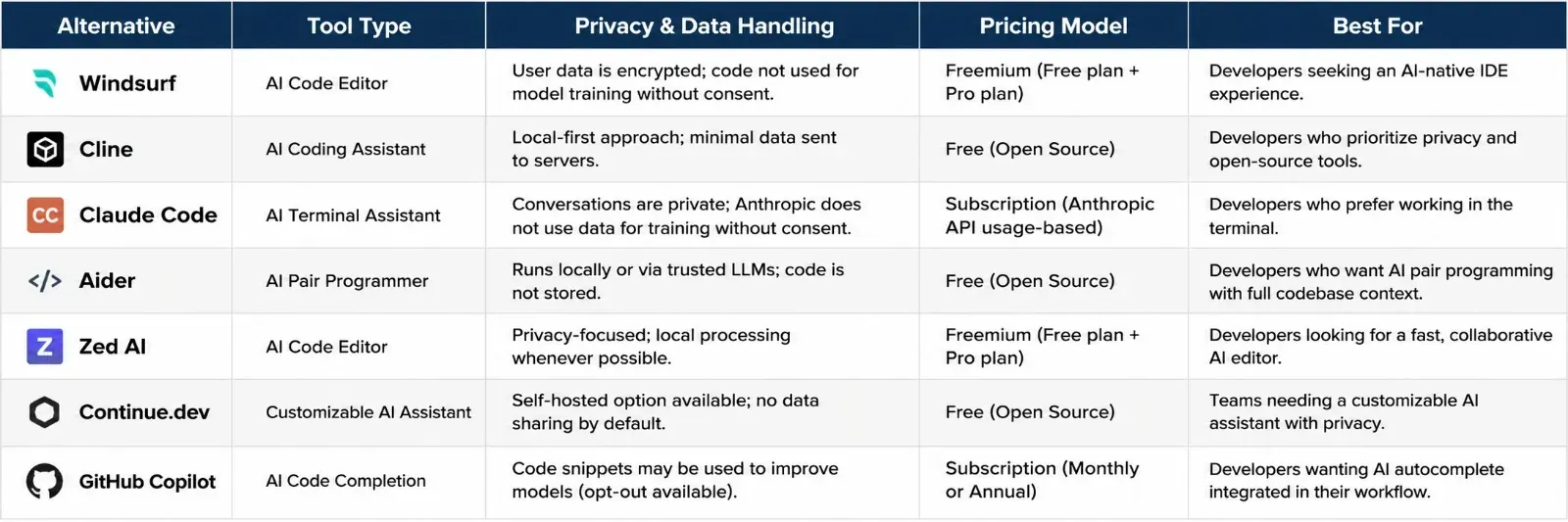
1. Windsurf: The Closest 1:1 Drop-in Replacement
Windsurf (developed by Codeium / Cognition) is the most natural alternative for developers who want the exact look, feel, and multi-file capabilities of Cursor without switching to a terminal tool.
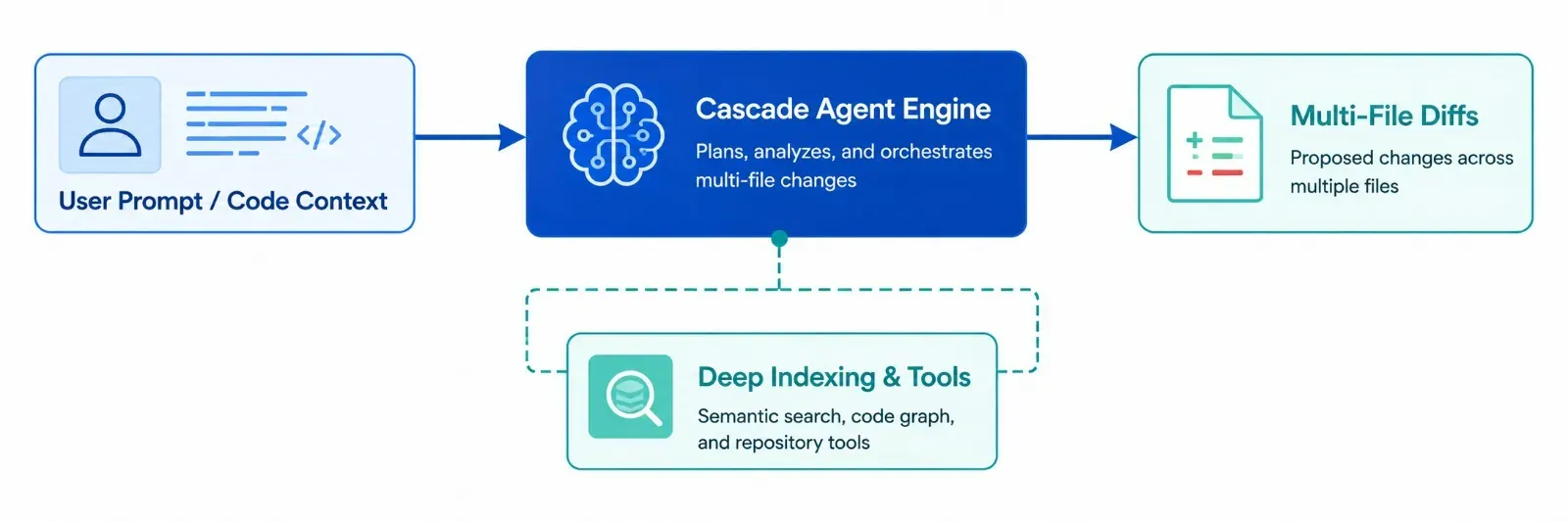
Privacy: Offers enterprise privacy modes that ensure user code is never used to train public models.
Pricing: Free tier with generous completions; Pro plan starts at $15 to $20 per month.
Coding Strength: Its Cascade engine tracks codebase context across multiple files automatically and proposes clean diffs with a single click.
Verdict: The best direct switch if you want a complete GUI editor that matches Cursor’s speed.
2. Cline: The Open-Source Privacy Champion
Cline is an autonomous coding agent that runs directly as an extension inside standard, official VS Code.
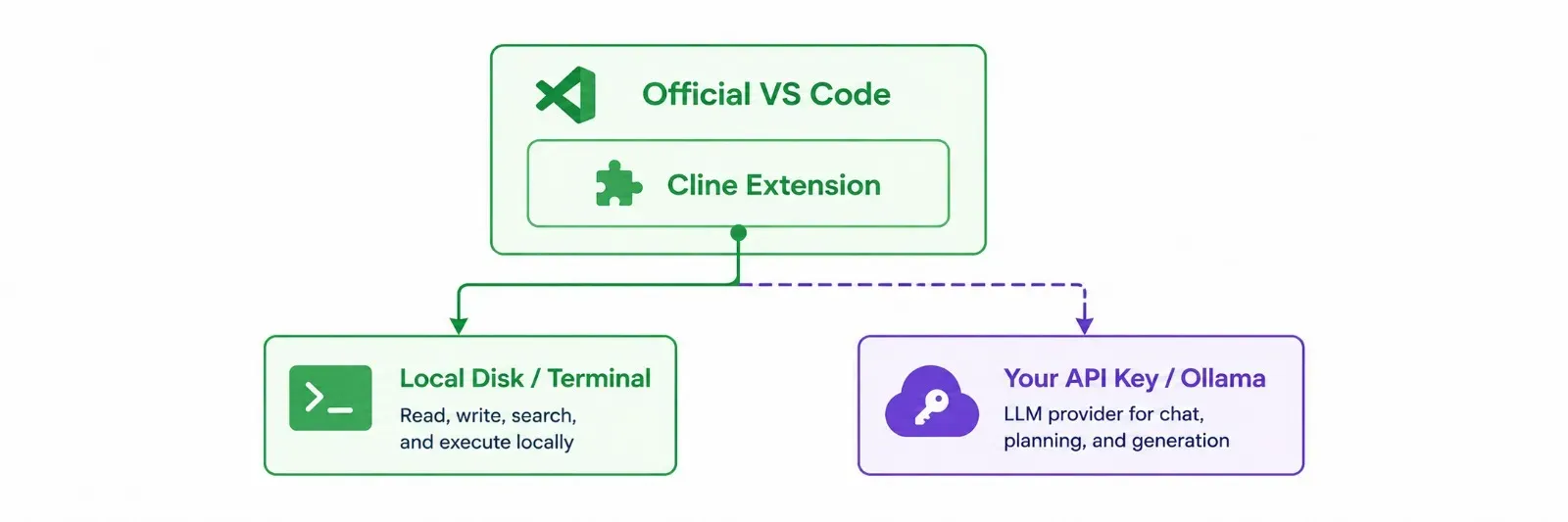
Privacy: Completely open-source. Your code stays on your machine, and requests go directly to your chosen API provider (OpenAI, Anthropic, DeepSeek) or local Ollama models.
Pricing: 100% free software. You only pay standard token rates to your LLM provider with zero platform markup.
Coding Strength: Can create files, run terminal commands, inspect compiler errors, and iterate until tests pass.
Verdict: The top choice for privacy purists who refuse to run closed-source editor forks.
3. Claude Code: Best for Monorepos and Terminal Power Users
Claude Code operates directly in your command line, reading directory trees, editing files, running test suites, and pushing Git commits autonomously.
Privacy: Operates under Anthropic’s commercial API data privacy standards, where API inputs are not used for model training.
Pricing: Accessible via Claude Pro ($20/month) or billed directly per token via Anthropic API console.
Coding Strength: Because it operates in the terminal, it handles massive multi-project refactors and test executions that choke browser-based or GUI agent sidebars.
Verdict: Best for experienced backend engineers who want deep agentic assistance without leaving their terminal workflow.
4. Aider: Best for Git-Native Autonomous Coding
Aider is a command-line pair programming tool that pairs directly with your local Git repository.
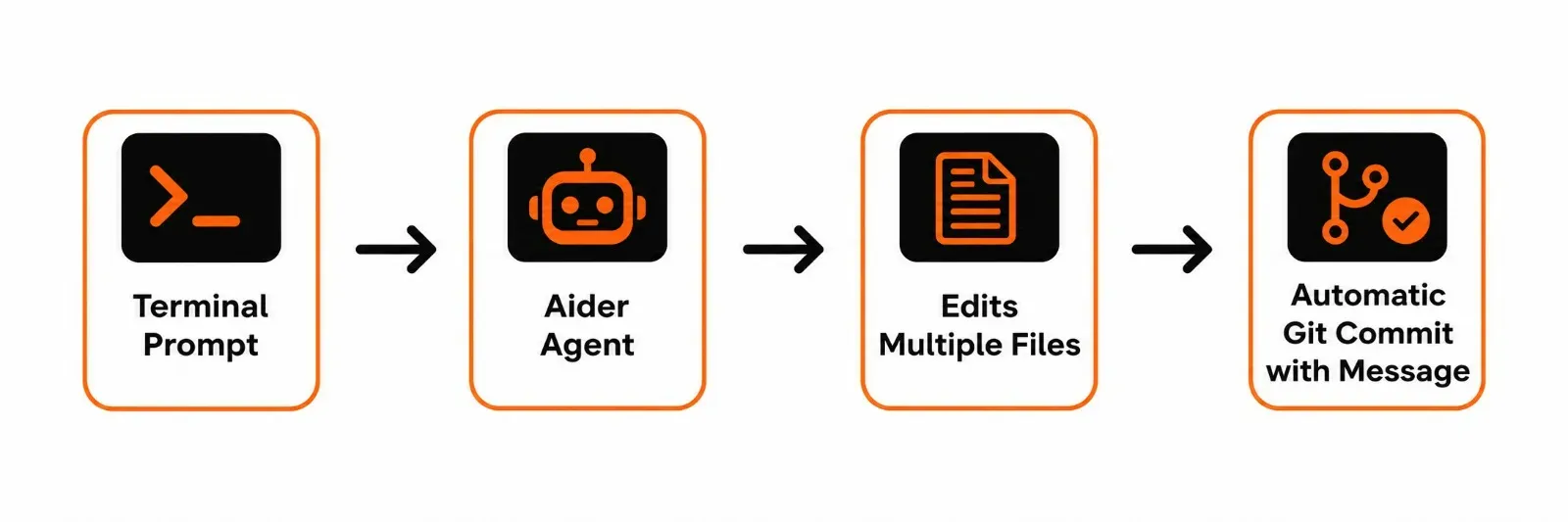
Privacy: Runs locally on your machine. Connects to any LLM via API keys or local open-weights servers.
Pricing: Free and open-source.
Coding Strength: Every successful edit or bug fix is automatically committed to your Git history with an explanatory commit message, making rollbacks effortless.
Verdict: Ideal for developers who want version-controlled, auditable AI edits without UI bloat.
5. Zed AI: Best for Ultra-Fast, Native Performance
Zed is an open-source code editor written in Rust, designed for extreme speed, sub-millisecond typing latency, and low memory consumption.
Privacy: Open-source codebase with transparent network logging and zero proprietary data lock-in.
Pricing: Free core editor. AI features allow you to bring your own API key (BYOK) for free or use pooled subscriptions.
Coding Strength: Integrates the Anthropic Model Context Protocol (MCP), letting you attach external documentation, databases, and custom tools directly into the editor prompt.
Verdict: The premier alternative for developers tired of heavy, battery-draining Electron editors.
6. Continue.dev: Best for JetBrains and Air-Gapped Environments
Continue.dev is an open-source AI code assistant that runs inside both VS Code and JetBrains IDEs (IntelliJ, PyCharm, WebStorm).
Privacy: Built specifically for enterprise compliance. Supports air-gapped deployments and local models via Ollama or vLLM.
Pricing: 100% free and open-source.
Coding Strength: Offers custom autocomplete models and side-panel chat that indexes local code repositories without sending telemetry to third parties.
Verdict: Best for Python and Java developers using JetBrains who want Cursor-style features in their native IDE.
7. GitHub Copilot: Best for Flat-Rate Budget Predictability
GitHub Copilot remains the industry standard for frictionless inline code autocompletion and workspace chat.
Privacy: Backed by Microsoft and GitHub enterprise security agreements and SOC 2 compliance.
Pricing: Flat $10/month for individuals or $19/user/month for business plans, with unlimited inline completions.
Coding Strength: Seamless integration across VS Code, Visual Studio, JetBrains, and Neovim without surprise token overage invoices.
Verdict: Best for risk-averse teams that want simple, predictable billing backed by enterprise service-level agreements.
The Migration Checklist: How to Move Off Cursor
If you decide to migrate away from Cursor, follow these four steps to ensure a smooth transition:
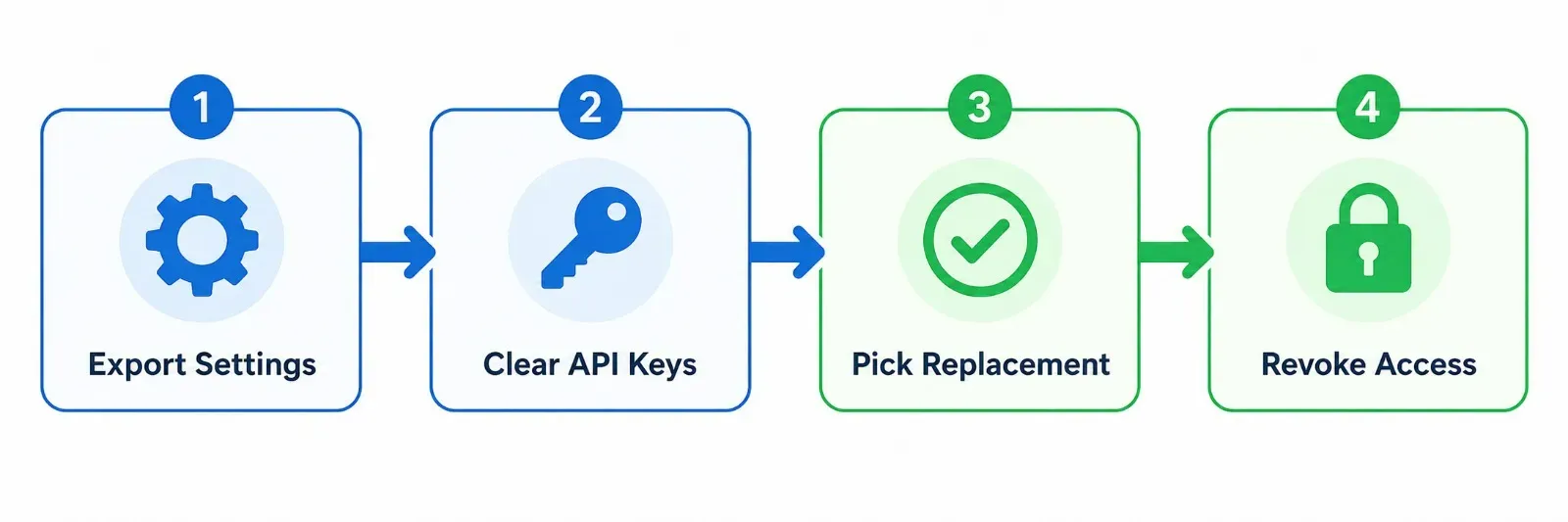
- Step 1: Export Your Configurations: If moving to another VS Code-based tool (like Windsurf or Cline), copy your keybindings.json, settings.json, and snippets from ~/.cursor/.
- Step 2: Remove Stored Credentials: Clear your custom API keys, GitHub tokens, and SSH keys stored in Cursor's settings panel.
- Step 3: Choose Your Replacement Path:
- Want an identical GUI experience? Install Windsurf.
- Want strict local privacy and open source? Install Cline inside standard VS Code.
- Want pure terminal speed? Install Aider or Claude Code.
- Step 4: Cancel Your Subscription: Downgrade your Cursor account before the next billing cycle to prevent unexpected usage overage charges.





Leave a Comment
Your comment is completely private and secure. We never publish comments publicly on our website. Your message will be sent directly to our team.